
Doucik · AI maths tutoring for school pupils Tutoring that has time for your child any time.
Explains step by step, talks with your child out loud and draws with them on a shared whiteboard.
Takes a few minutes · no payment card neededTakes a few minutes · 3 free lessons to start · no payment card needed

⭐ 4.9/5 in Google reviews of our tutoringBacked by the Doučse Education Centre

Already have an account? Sign in
- Maths, Years 3–11
- Step by step
- Shared whiteboard
- Geometry with compasses and protractor
- Photo of the exercise
- Talks out loud and in the chat
- Parent dashboard
How it works
Getting started takes a few minutes.
- 1. Account
You create an account
A few minutes, by email or with Google.
- 2. Child
You add your child
Your child gets their own sign-in — a nickname and password.
- 3. First lesson
Your child starts their first lesson
They talk with Doucik out loud or in the chat, can photograph an exercise from their workbook and work through it step by step on a shared whiteboard.
And you stay in the picture
A parent summary after every lesson. You set the lesson limits.
How fast does Doucik reply?
Usually within 15–20 seconds. Before answering, it works the problem out on the side, checks the result and gets the board ready — on a really hard question it takes a few seconds more.
On computer and phone alike
Doucik runs in the browser — nothing to download or install. At home on a computer with a big whiteboard, or on the go as an app on your phone.
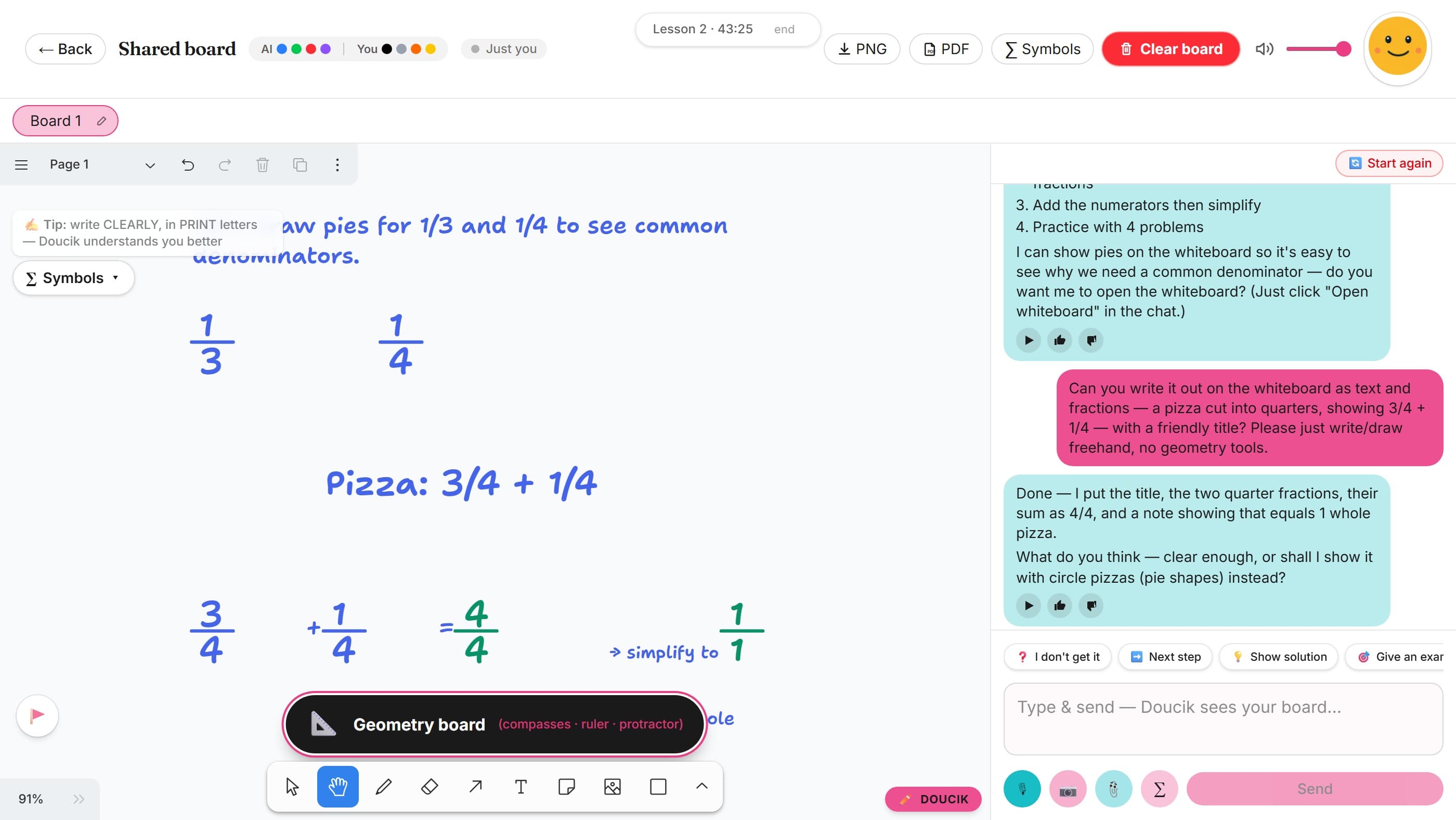
On a computer: a big whiteboard for constructing and working things out — just like at school.
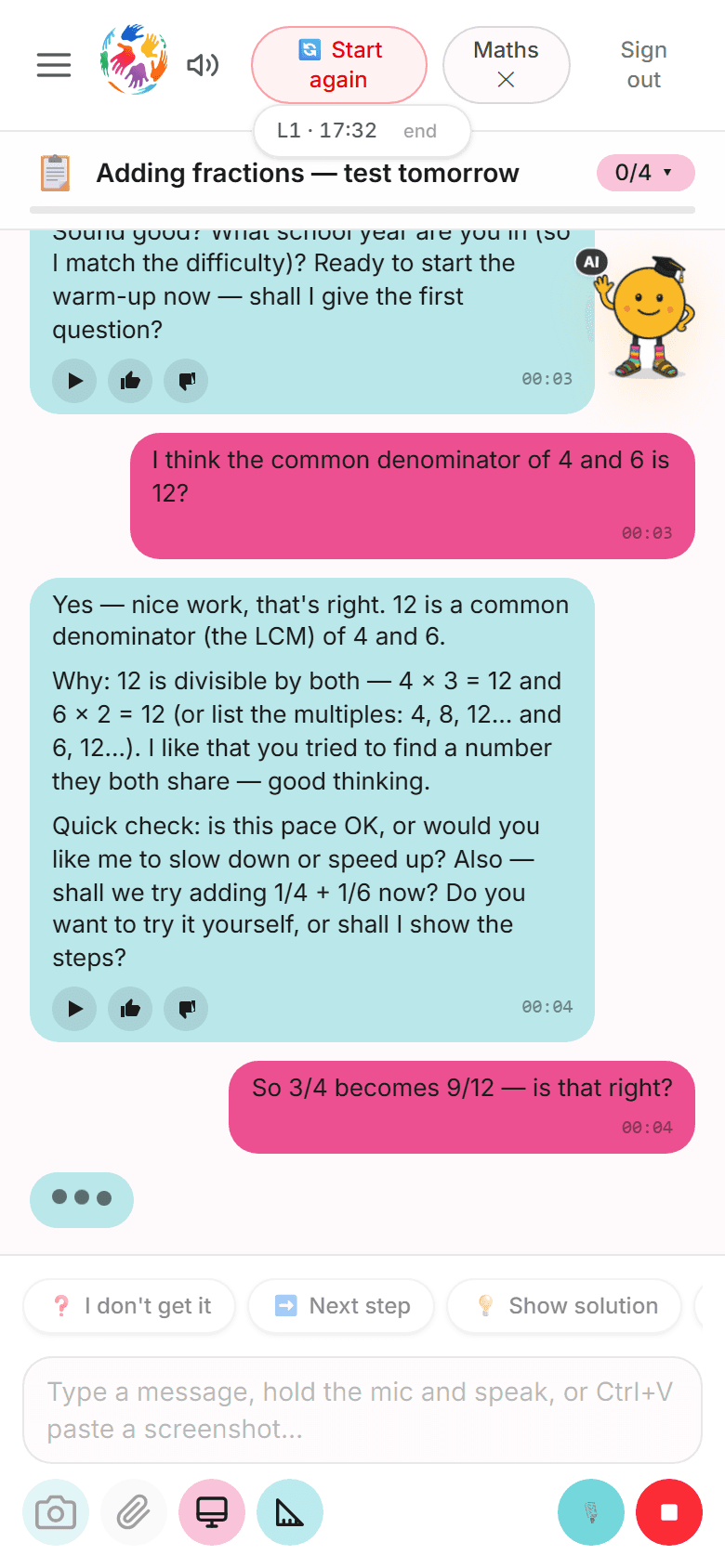
On a phone: add it to your home screen and it opens like an app — always to hand.
For parents
After every lesson, you know what your child practised.
In the parent dashboard you'll find a summary of every lesson. You set up the account and the lesson limits.
Lesson summary
Lesson 1 · Maths
- Topic covered
- Fractions on a pizza — what ¾ is and what's left.
- What went well
- Drew a pizza cut into 4 slices and worked out that ¼ is left.
- Tip for home
- When you cut a pizza or a cake, ask what fraction is left.
- Next time
- Adding fractions with the same denominator.
- You create the account. Your child gets their own nickname and password.
- You set lesson limits per day and per week.
- Doucik sticks to learning. If your child writes something serious, it responds with care and we let you know.
- Your child can learn any time, evenings too.
Video
Prefer a video? Doucik in 42 seconds.
See how Doucik teaches — in 42 seconds
Who's behind it
Doucik is backed by the Doučse Education Centre
average Google rating of our tutoring
tutors at our centre
Doucik is a practice buddy made by people who tutor children live.
Why we created Doucik
Doucik was built by the team behind the Doučse Education Centre in the Czech Republic — teaching children for years, with hundreds of tutors across the country, in classrooms and online. In tutoring we see the same thing time and again: a child understands the material in a lesson with their tutor, but between lessons they have no one to practise with.
That's why Doucik exists. It doesn't replace live teaching or a tutor — it's a practice buddy any time, anywhere: in the evening over homework, at the weekend before a test, on the bus home from school. It explains patiently, lets your child work things out and happily explains it a fifth time.
And because it's built for children, it's built safely: the account is created by a parent, Doucik sticks to learning, and the parent dashboard shows you what your child has been working on.
The Doučse Education Centre team
What parents say about our tutoring
Genuine Google reviews of live tutoring at the Doučse Education Centre, translated from Czech. Doucik builds on live lessons as a practice companion.
“Our daughter was really struggling with maths. I paid for two months of tutoring with an online tutor and her maths improved enormously. On top of that, she built a genuinely lovely relationship with her tutor and looks forward to every lesson. One of the best decisions I've ever made.”
“My daughter has maths tutoring to prepare for her entrance exams. I can recommend it. Kind, explains things well, gives plenty of praise. Kája couldn't be happier.”
Start free — upgrade when you're ready
To start, every family gets 2 Standard lessons and 1 Pro lesson free — no payment card needed. When you're ready, buy a one-time lesson pack (Standard or Pro) in the Doucik app. One lesson = 60 minutes.
One-time lesson packs from £29 for 8 lessons — no subscription, nothing renews, and you'll always see the price before you pay.
See plans & pricing →Doucik is an AI — now and then it makes a mistake, like any tutor.
A clunky formula, a slower reply — it doesn't affect the learning.
~3 in 100 replies*
A drawing doesn't work first time — it owns up and fixes it.
~2 in 100 replies*
A wrong result presented as correct — rare, so always double-check important results.
fewer than 1 in 100*
We keep pushing the error rate down with every improvement. How we measure mistakes, how to reduce them and what to do when they happen → Doucik Accuracy
* measured in test lessons with clear communication (legible tasks, sharp photos), updated 7/2026
Which tutor should you pick?
Both teach with the same patience and warmth. They differ in accuracy on harder topics, whiteboard work and voice.
Standard
A handy buddy for everyday maths

Pro
A precise buddy for harder topics
- strong point
- handles well
- works, but worth double-checking sometimes
For perspective: a live tutor also pauses to think and prepare — compared to that, the tutor is still lightning fast. 😉
A fair word up front
Even Pro is an AI — it occasionally slips, just like a person would. You can help a lot too: write clearly, photograph tidy notes and keep the whiteboard organised. Not sure about an answer? Just say “check that” — or start fresh with the Restart button. The cleaner the input, the more accurate the tutor.
Mix and match by topic
Packages can be combined — Standard for everyday practice and a few Pro lessons for systems of equations or geometry. Your child picks which one to use when starting a lesson.
Frequently asked questions
What is Doucik and who is it for?
Doucik is an AI maths tutor backed by the Doučse Education Centre, for school pupils (up to Year 11). Children chat with it by voice or text, photograph exercises from their workbook, work through problems step by step and do constructions. It's a companion to live tutoring — a practice buddy anytime, anywhere, not a replacement for a tutor.
What do we get in the free trial?
Every family receives 2 Standard lessons and 1 Pro lesson free when they create a profile. No payment card and no commitment — they're credited automatically when you add your first child.
How much do lessons cost and how do I pay?
You start free — every family gets 3 trial lessons (2 Standard + 1 Pro), no payment card needed. When you're ready, you buy a one-time lesson pack in the Doucik app from Google Play (Standard: 8 lessons for £29, Pro: 8 lessons for £69) — no subscription, nothing renews, and lessons never expire. You'll always see the price before you pay.
What's the difference between Standard and Pro lessons?
Standard covers everyday practice and homework. Pro thinks harder on difficult problems and is more accurate, has a more natural voice and suits harder material, such as preparing for entrance exams. Pro also draws textbook animations (Pythagoras, unit conversions, percentages…), 3D solids and probability simulations on the board — Standard has the board, notes, constructions and graphs. Each lesson (Standard or Pro) is a 60-minute window in which your child works with Doucik.
How do I set up access for my child?
The profile is created by an adult (a parent or other legal guardian): you register, confirm your consent and add your child — you set up a nickname and password for them. Your child then signs in on their own with that nickname and password. It takes just a few minutes.
Is it safe for children?
An account is always created by an adult, and children can't see purchases or payments. In the parent dashboard you can see what your child practised, and you can set a weekly lesson limit. Doucik sticks to learning — if your child writes something serious, it responds with care and we let you know.
Will Doucik replace a tutor?
No — and that isn't the aim. Doucik is a practice companion between lessons: material your child understands with a tutor or at school gets practised and reinforced with Doucik. It also pairs nicely with live tutoring — it keeps the practice going between sessions with any tutor.
Didn't find your answer? Email us at hello@doucik.com — we're happy to help.
A practice buddy — any time, anywhere.
- 3 free lessons
- no payment card
- no subscription
- takes a few minutes